Introduction
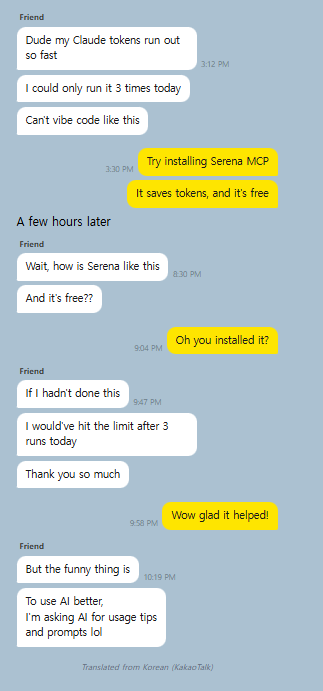
When you tell an AI “find everywhere this method is used” — what’s actually happening under the hood?
I was vibe coding with Serena MCP. Installed it, connected it, it worked, so I just used it. Then one day it stopped connecting, and while debugging the mess, I realized this tool has core concepts from compiler theory baked right into it.
This post isn’t a setup guide or a feature tour. It’s an explanation of “what this thing is actually doing internally” — written so anyone can follow along, even without a CS degree.
Background: How Does AI Read Code?
When you say “find this function” to an AI, how does it find it? The simplest approach is the same as Ctrl+F — open the file and search the text.
grep -r "findById" ./src
This finds every line containing the string “findById”. Simple and intuitive. But there’s a problem.
The Limits of Text Search
Let’s say you’re searching a library for books about “run.” The Ctrl+F approach means flipping through every page of every book looking for the word “run.” You’d end up with all of these:
- “run the server on port 8080” (what you wanted)
- “I went for a morning run” (not this)
- “runtime error at line 42” (also not this)
Same word, completely different meanings. The same thing happens in code:
Searching for "findById":
✅ taskRepository.findById(id)     ← this is what we wanted
❌ findByIdResult = ...             ← it's a variable name
❌ // findById is deprecated        ← it's in a comment
❌ "findById"                       ← it's inside a string
And there’s an even bigger problem: token consumption.
Why Do Tokens Run Out?
AI coding tools (Claude, Cursor, etc.) have something called a “context window.” Think of it as the AI’s short-term memory capacity. When the AI reads code, it fills up this capacity — and when it’s full, it can’t read any more.
With text search, even if you only want “one specific save method,” the AI still has to read the entire file. To look at 5 lines in a 500-line file, the AI loads all 500 lines into memory.
To find a 5-line method in a 500-line file:
→ Reads all 500 lines
→ Consumes ~2,000 tokens
→ Read just 10 files like this → 20,000 tokens
→ Tokens drain fast
In the chat above, my friend said “you’d probably burn through it in 3 runs.” That’s exactly this problem. Every time the AI reads code, tokens get used — and when tokens run out, the conversation stops.
What Serena Does Differently: Reading Code as “Structure”
Let’s go back to the library analogy.
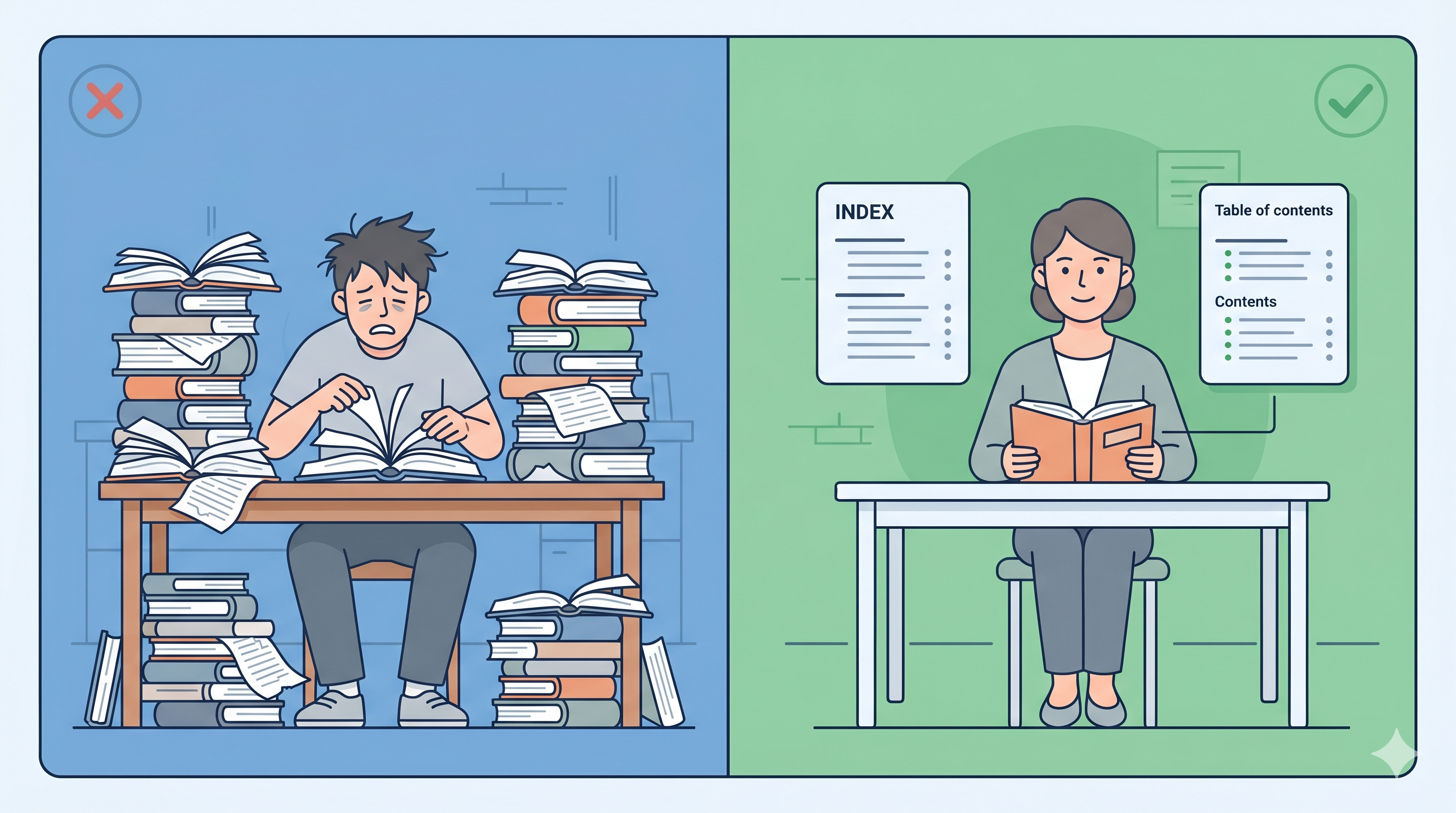
Text search (grep) is flipping through every page of every book. Serena is checking the table of contents and the index.
If you ask a librarian “find me something about apples,” a good librarian doesn’t start reading every book from page one. They check the table of contents, find “Chapter 3: Fruits → 3.2 Apples,” and open to exactly that page. That’s what Serena does.
The technology that makes this possible is AST (Abstract Syntax Tree) and tree-sitter.
AST: Building a Table of Contents for Your Code
AST stands for “Abstract Syntax Tree” — intimidating name, simple idea. It’s code organized into a hierarchical structure.
Say you have this code:
public void save(Task task) {
    repository.save(task);
}
To human eyes, it’s just text. But converted to an AST, it becomes this structure:
Method Declaration
├── Access modifier: public
├── Return type: void
├── Name: save
├── Parameters:
│   └── task of type Task
└── Body:
    └── Call repository.save (argument: task)
The book analogy:
As text:   "Today the weather was nice so I went hiking..."  (read the whole thing to know what it's about)
As AST:    Chapter 3 > Section 3.2 > Hiking story           (the table of contents tells you where everything is)
With this “table of contents,” you can jump straight to the method you want without reading the entire file. That’s where the token savings come from.
tree-sitter: The Machine That Builds the Table of Contents Instantly
To build the AST (table of contents), you need to analyze the code. The tool that does this analysis is tree-sitter.
tree-sitter is a program that reads code and understands its structure. It knows things like “this opening brace starts a class” and “that closing brace ends a method.” Built in Rust (a fast systems language), it can analyze thousands of lines of code in an instant.
Three key features:
1. Incremental updates: When one line changes, it doesn’t re-analyze the whole file — just the changed part. If you edited 1 line in a 500-line file, it only re-reads that 1 line.
2. Error-tolerant: It can still analyze code even when there are syntax errors. This is why your IDE shows autocomplete while you’re still typing — it understands structure even from incomplete code.
3. No pre-indexing: IntelliJ and VS Code show an “Indexing…” spinner when you open a project. tree-sitter skips all that — it analyzes each file on demand, right when it’s needed.
Why Ctrl+F Falls Short (One Line of CS Theory)
You might think “can’t we just do really good Ctrl+F?” The thing is, code has nested structure. Classes contain methods, methods contain if-statements, if-statements contain more method calls.
class Service {
    void process() {
        if (condition) {
            helper.save(data);  // ← this save belongs to helper
        }
    }
    void save(Task task) {      // ← this save belongs to Service
        repository.save(task);  // ← this save belongs to repository
    }
}
Search for “save” as text and you get all three — but each one is a different method on a different object. To understand the difference, you need to track “which set of braces is this inside?” — which plain text search can’t do. This is what CS calls the “limits of regular languages”: regex (the engine behind Ctrl+F) can’t track nested brackets. You need a parser that actually understands structure.
So What’s Actually Better?
1. Token Savings — The Core Benefit
When you only want the save method from a 500-line Java file:
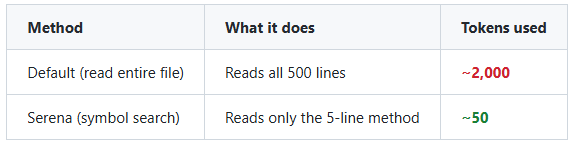
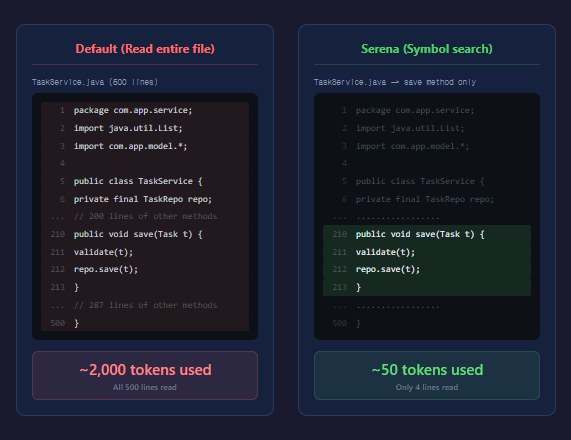
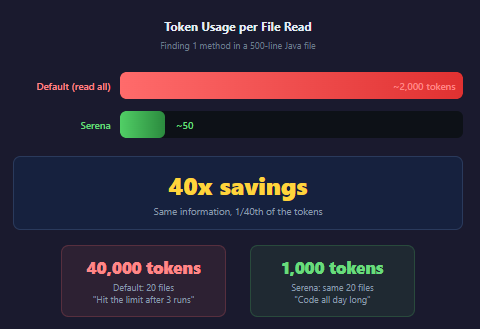
40x difference. In a single session, you might read 10 or 20 files like this. Read 20 files the standard way: 40,000 tokens gone. With Serena: 1,000 tokens. That’s the difference between “burned through it in 3 runs” and “working all day without hitting the limit.”
Community-reported token savings range from 50% to 90%. A lightweight fork called serena-slim goes further by compressing Serena’s own tool descriptions, achieving an additional 50.3% reduction. That said, these numbers are mostly anecdotal — no controlled A/B test has been published yet.
2. Accurate Reference Tracking
When you want to find everywhere a method is called:
Text search: "save" → catches variable names, comments, save methods on other classes → have to check each one manually
Serena:      "TaskService.save" → returns only the exact places that call that specific method
Because the results are precise, the AI doesn’t waste tokens doing “this one’s not relevant… neither is this one…”
3. Safe Refactoring
When you rename a method:
- Text replacement: change “save” to “store” → risk changing unrelated
savemethods too - Serena: renames exactly
TaskService.savetoTaskService.store, nothing else
This is the same principle as Shift+F6 (Rename Symbol) in IntelliJ or VS Code. IDEs use AST internally too. Serena brings that capability into AI coding tools.
The Connection to Compilers
After reading this far, you might think “AST, parsers… I’ve heard these terms somewhere.” You have — they’re from compilers.
A compiler is the program that transforms your source code into something a computer can execute. The process looks like this:
Source code → [Step 1: Lex & Parse] → [Step 2: Build Structure] → [Step 3: Optimize] → Executable
                  Read the text            Build the AST             Generate machine code
Serena borrows only steps 1 and 2. It parses the code and builds the structure — then exposes that structure as tools the AI can query. It doesn’t compile anything, but it understands code the same way a compiler does.
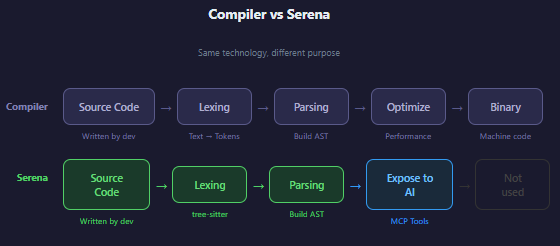
This is what CS students learn in compilers class, formal languages, automata theory. When you’re vibe coding, you’re not thinking about any of this — but this theory is quietly running underneath.
Real-World Debugging: When Serena Won’t Start on Windows
Serena runs internally via a tool called uvx. Think of uvx as Python’s version of npx — it installs a package into a temporary environment and runs it immediately.
The problem is that Windows 11’s Smart App Control (SAC) blocks uvx.exe.
error: An application control policy blocks this file from running. (os error 4551)
The cause: uv.exe / uvx.exe are not code-signed. There’s an open issue at astral-sh/uv#18967 — still unresolved as of April 2026.
The Fix
The only option is to disable Smart App Control:
- Windows Security → App & browser control → Smart App Control → Off
- Warning: once turned off, it cannot be turned back on (requires reinstalling Windows)
Disabling SAC doesn’t remove Windows Defender or SmartScreen — both keep running — so the practical security impact is low. That said, you’re removing an extra layer of protection against unsigned executables, so it’s worth being careful about running random .exe files you download yourself.
Even installing via winget doesn’t help — the binary itself is unsigned, so it gets blocked regardless. Until the uv team adds code signing, Serena won’t run in a SAC-enabled environment.
What I Learned
-
Vibe coding tools are still built on CS fundamentals. AST, parsers, formal language theory — these aren’t “useless academic theory.” They’re the core of tools we use every day.
-
Text search and structural search are in different leagues. I used to think grep was good enough. The gap in token efficiency and accuracy is not even close.
-
Knowing the internals makes debugging possible. “Serena isn’t working” → uvx → uv → code signing → Smart App Control. Without understanding the internals, “reinstall it” is the only move you’ve got.
Coming Up Next
The “50-90% savings” numbers floating around the community are based on feel, not data. So I’m planning to run an actual experiment — the same task with Serena ON vs. OFF, measuring real token consumption in a controlled A/B test. I’ll share the results in a follow-up post.
Comments