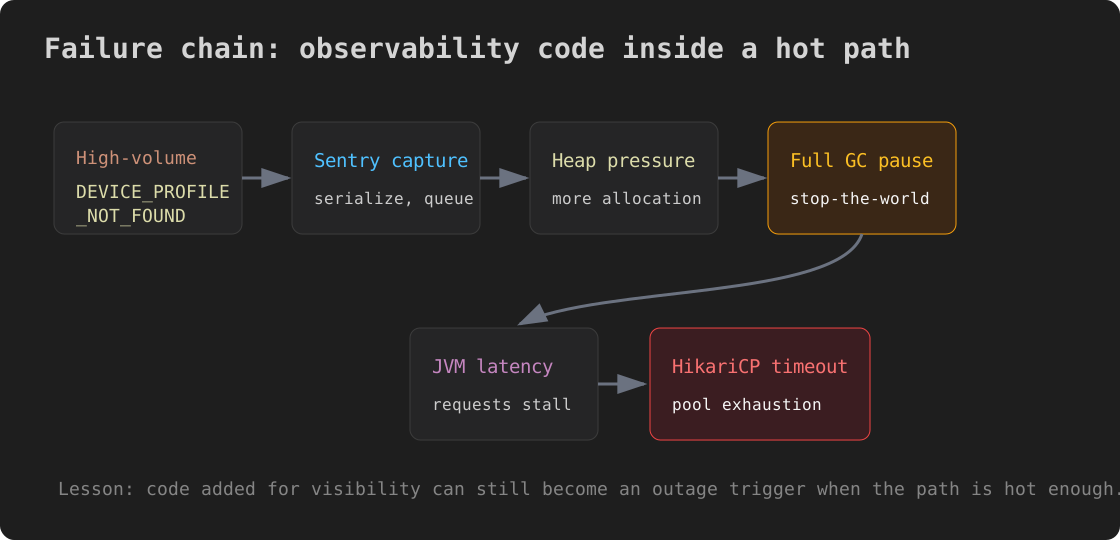
We added monitoring and the server died. More precisely, code added to capture errors more clearly increased GC pressure, stalled the JVM, and cascaded into HikariCP pool exhaustion.
This is a short incident note about that chain, and about the three wrong theories we chased before finding the actual trigger.
Background: Better Error Tracking
We decided to send BusinessException events to Sentry. Until then, those domain exceptions were only logged. We wanted to see how often specific error codes happened in production.
The change looked harmless. We added Sentry capture to GlobalExceptionHandler.handleBusinessException:
@ExceptionHandler(BusinessException.class)
public ResponseEntity<ErrorResponse> handleBusinessException(
        BusinessException ex, HttpServletRequest request) {
    log.warn("BusinessException: code={}, message={}", ex.getCode(), ex.getMessage());

    Sentry.withScope(scope -> {
        scope.setFingerprint(List.of("business-exception", ex.getCode()));
        scope.setTag("error.code", ex.getCode());
        Sentry.captureException(ex);
    });

    return ResponseEntity.status(ex.getStatus())
            .body(ErrorResponse.of(ex));
}
It was not complicated code. Nothing happened for two days after deployment.
The Outage
At around 10 p.m., Grafana alerted that the HikariCP connection pool wait queue was climbing fast. Service latency rose, and connection timeout errors followed.
The pool exhaustion pattern looked familiar:
- Some request holds a connection too long
- Waiting threads pile up
- Eventually every new request times out
Three Wrong Theories
Theory 1: Slow Query
The first suspect was the database. We checked MySQL processlist and ran EXPLAIN. A few queries had suspicious plans.
We analyzed indexes and optimized the query.
Result: the service stabilized briefly after restart, then failed the same way again. The bad-looking queries were victims of the cascade, not the cause.
Theory 2: Infrastructure Limit
The second suspect was the EC2 instance itself. If a t3.medium with 2 vCPUs was saturated, the JVM could fail to keep up with GC and request threads could stall.
CloudWatch did show CPU rising to 65-98%.
But traffic was not unusually high. “Why only today?” remained unanswered.
Conclusion deferred: CPU looked more like a result than a cause.
Theory 3: Recent Deployment
“Could yesterday’s deployment be the trigger?” We should have asked that first.
We checked the last 24 hours of prod deploy commits. One of them added Sentry capture to GlobalExceptionHandler.
That connected the dots.
Actual Trigger: High-Volume Error Code + Sentry SDK Allocation
One device screen was polling indefinitely. When the device was not registered on the server, every poll raised DEVICE_PROFILE_NOT_FOUND.
That error code appeared 580+ times in 5 hours. It was 99% of all BusinessException events.
Previously, that exception was just one log.warn. After the change, every request did this:
Sentry.withScope(scope -> {
    // create Scope
    // create Hint
    // serialize Exception including stack trace
    // enqueue event
    Sentry.captureException(ex);
});
The Sentry SDK serializes each exception and queues events for a background worker. 580 events over 5 hours sounds low, but each capture still allocates objects. Looking at the metrics and logs together, the most plausible chain was extra heap allocation from Sentry capture leading to GC pressure.
Observed flow:
- Heap pressure increased -> more Young Gen GC
- Old Gen accumulated -> Full GC stop-the-world pauses
- JVM threads stalled during Full GC -> Hikari housekeeper delay around 1m 30s
- EC2 CPU spiked -> up to 98%
- JVM latency increased -> DB connections were held longer -> pool exhaustion cascade
Related Sentry Java issues exist:
- sentry-java #1851: Memory issues with breadcrumbs
- sentry-java #3182: Significant memory usage
- sentry-java #2225: throwableToSpan keeps growing
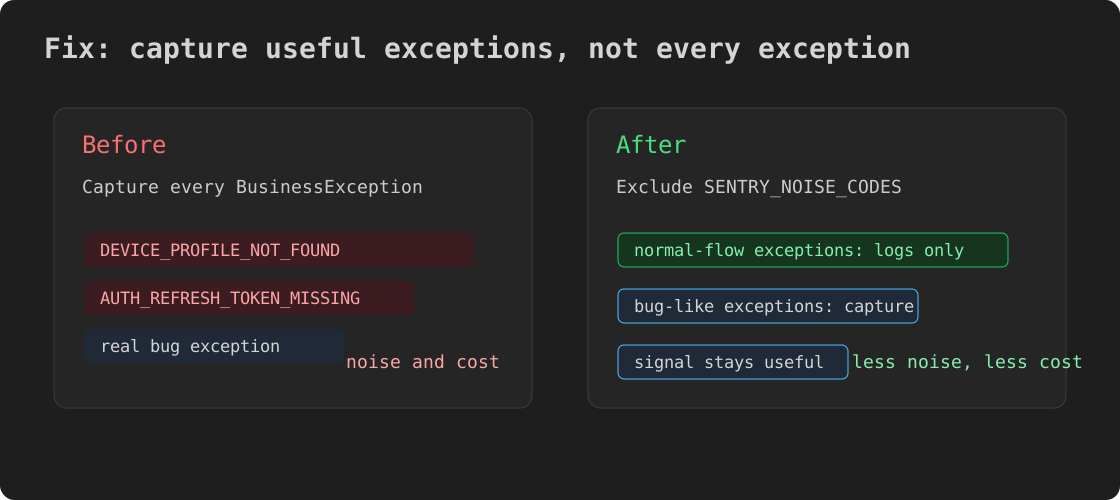
Sending every normal-flow high-volume exception to Sentry had poor signal-to-cost tradeoff.
Fix
We added a noise-code exclusion list to GlobalExceptionHandler:
private static final Set<String> SENTRY_NOISE_CODES = Set.of(
    "DEVICE_PROFILE_NOT_FOUND",   // normal polling flow
    "AUTH_REFRESH_TOKEN_MISSING"  // normal token expiry flow
);

@ExceptionHandler(BusinessException.class)
public ResponseEntity<ErrorResponse> handleBusinessException(
        BusinessException ex, HttpServletRequest request) {
    log.warn("BusinessException: code={}, message={}", ex.getCode(), ex.getMessage());

    if (!SENTRY_NOISE_CODES.contains(ex.getCode())) {
        Sentry.withScope(scope -> {
            scope.setFingerprint(List.of("business-exception", ex.getCode()));
            scope.setTag("error.code", ex.getCode());
            Sentry.captureException(ex);
        });
    }

    return ResponseEntity.status(ex.getStatus())
            .body(ErrorResponse.of(ex));
}
The original intent stayed: capture meaningful errors. The normal-flow noisy codes stopped going to Sentry.
We also added defensive measures:
- HikariCP pool size 20 -> 30, as a buffer against cascade propagation, not as the root fix
- GC logging with
-Xlog:gc*:file=/app/data/gc.logfor faster diagnosis next time
Lessons
1. Check frequency before changing exception hot paths
handleBusinessException handles every domain exception. Before adding work there, check how frequently each error code appears in prod.
docker logs <container> --since 1h 2>&1 | grep -c 'DEVICE_PROFILE_NOT_FOUND'
Less than 1/hour is probably safe. More than 100/hour deserves heap and CPU impact review.
2. “Capture every exception” is not a good default
Sentry is best for real bugs. Normal-flow exceptions such as missing resources, expired auth, or validation failures can become noise. In worse cases, they can create performance cost.
Checklist before adding capture:
- Is this error code exceptional, or part of normal flow?
- How often does it happen in production?
- Is the capture cost acceptable: allocation, serialization, queueing?
3. Put “what changed recently?” in Phase 1
The first incident step should include checking the last 24 hours of deploy commits. Databases and infrastructure are tempting first suspects, but the highest-probability cause is often the thing that changed most recently.
git log --since='24 hours ago' --pretty=format:'%h %ci %s' origin/main | head -10
Comments