Previous post: The Order Total Was Doubled — A Database Multiplication Bug, Explained for Non-Engineers explained this bug using a “merging two spreadsheets” analogy. This post dives into the JPA/Hibernate internals: exactly why it happens, why
DISTINCTdoesn’t help, and the proper fix.
To recap: the DB had only 2 order line items, but the API response returned 4. The root cause was two @OneToMany collections JOIN FETCHed in a single JPQL query.
Root Cause: Cartesian Product from Two Collections
The problematic query:
@Query("SELECT o FROM Order o " +
       "LEFT JOIN FETCH o.lineItems " +        // @OneToMany List
       "LEFT JOIN FETCH o.appliedDiscounts " +  // @OneToMany Set
       "JOIN FETCH o.customer c " +
       "WHERE o.billingYear = :year AND o.billingMonth = :month " +
       "ORDER BY c.name")
List<Order> findAllByMonth(...);
lineItems (List) and appliedDiscounts (Set) are JOIN FETCHed simultaneously.
The SQL Result
The generated SQL looks like:
SELECT o.*, oli.*, oad.*
FROM orders o
LEFT JOIN order_line_item oli ON oli.order_id = o.id
LEFT JOIN order_applied_discount oad ON oad.order_id = o.id
WHERE ...
With 2 lineItems and 2 appliedDiscounts for Order 369:
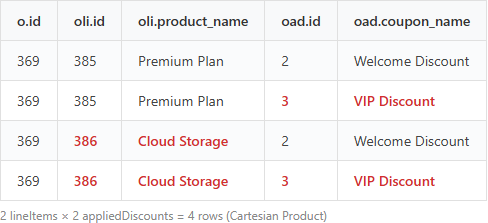
2 × 2 = 4 rows. This is a cartesian product.
How Hibernate Handles the Collections
When Hibernate maps these 4 rows back to entities:
Set(appliedDiscounts): Auto-deduplicates viaequals/hashCode→ 2 entries (correct)List(lineItems): Bag semantics — no deduplication → 4 entries (oli.id 385, 385, 386, 386)
List is an ordered collection. Hibernate adds each SQL row’s line item to the List as-is. When the same entity appears in multiple rows, the same object gets added multiple times.
“Why not just use Set for everything?” Order line items need to be displayed in insertion order. Set doesn’t guarantee ordering, so List was the correct choice. The right data structure choice became an unexpected bug when it met a cartesian product.
Why No MultipleBagFetchException?
In Hibernate 5 and earlier, fetching two List collections simultaneously would throw MultipleBagFetchException and block startup. But here, one collection is a List and the other is a Set, so no exception is thrown. The data silently inflates without any error — which makes it arguably more dangerous.
DISTINCT Doesn’t Fix It
First attempt — add SELECT DISTINCT:
@Query("SELECT DISTINCT o FROM Order o " +
       "LEFT JOIN FETCH o.lineItems " +
       "LEFT JOIN FETCH o.appliedDiscounts " + ...)
No effect. Here’s why:
In Hibernate 6, JPQL DISTINCT deduplicates the root entity (Order) in the result list. It prevents the same Order object from appearing multiple times.
But it doesn’t touch the lineItems List inside each Order. Order 369 appears once in the result, but its lineItems collection already has 4 entries.
Solution: Separate the Collection Fetches
Core principle: Never JOIN FETCH multiple @OneToMany collections in a single query.
The Fix: @BatchSize
// Order.java
@OneToMany(mappedBy = "order", cascade = CascadeType.ALL, orphanRemoval = true)
@BatchSize(size = 50)  // Loaded via separate IN query
private Set<OrderAppliedDiscount> appliedDiscounts = new LinkedHashSet<>();
// OrderRepository.java — removed appliedDiscounts JOIN FETCH
@Query("SELECT DISTINCT o FROM Order o " +
       "LEFT JOIN FETCH o.lineItems " +
       // LEFT JOIN FETCH o.appliedDiscounts — removed!
       "JOIN FETCH o.customer c " +
       "WHERE o.billingYear = :year AND o.billingMonth = :month ...")
List<Order> findAllByMonth(...);
Now the execution flow:
- Query 1: Order + lineItems JOIN FETCH → rows = number of lineItems (no duplication)
- Query 2 (automatic):
SELECT * FROM order_applied_discount WHERE order_id IN (?, ?, ..., ?)→ batches of 50
One query became two, but the cartesian product is eliminated and data is accurate.
If annotating every entity gets tedious, you can set a project-wide default in application.yml:
spring:
  jpa:
    properties:
      hibernate:
        default_batch_fetch_size: 100
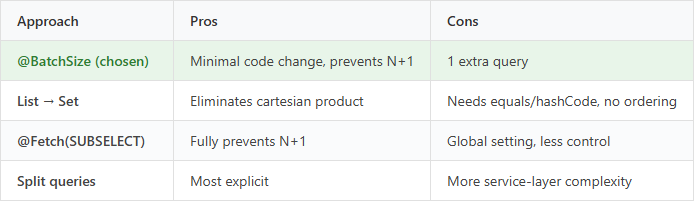
Alternatives
Key Takeaways
JOIN FETCHing multiple @OneToMany collections in one query
→ SQL Cartesian Product → List(bag) duplication → inflated data
- DB is fine, API is wrong → Check JPA collection fetch strategy
DISTINCTonly deduplicates root entities, not List contentsSetauto-deduplicates,List(bag) does not- Fix: Fetch one collection per query +
@BatchSizefor the rest
Comments