I’m building a SaaS subscription management system. After generating April orders, something looked very wrong.
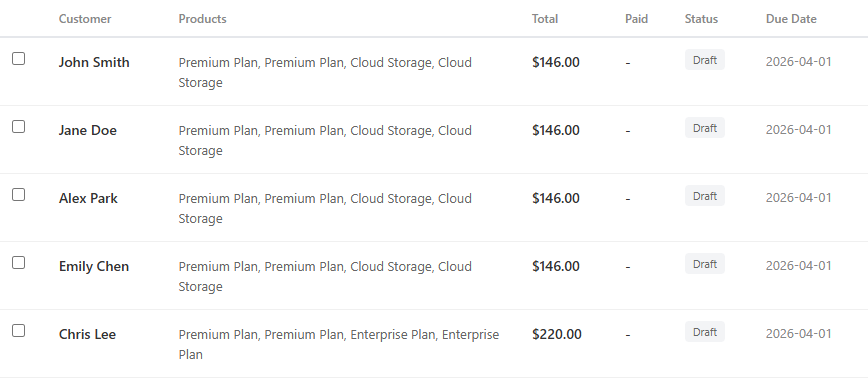
Every customer’s total was exactly double what it should be. A $52.00 subscription became $104.00. A $69.00 order became $146.00.
Opening the detail view was even more baffling:
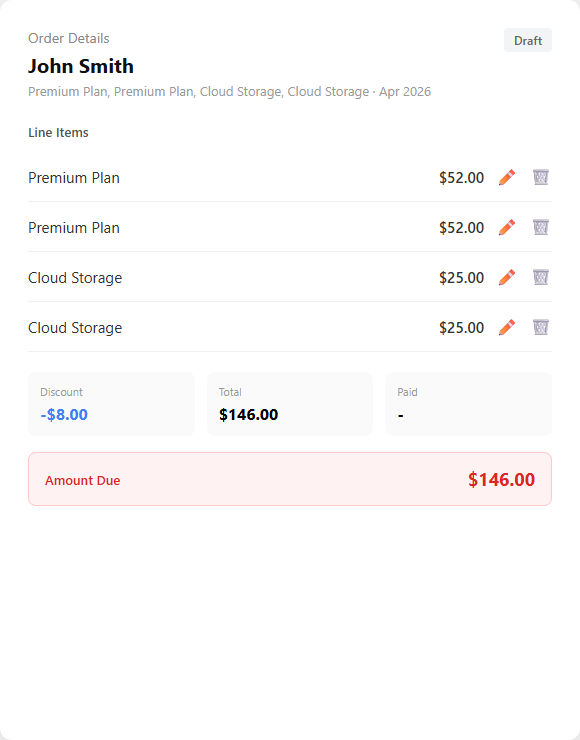
“Premium Plan” appears twice. “Cloud Storage” appears twice. Each product was charged double.
But then I noticed something at the very bottom:
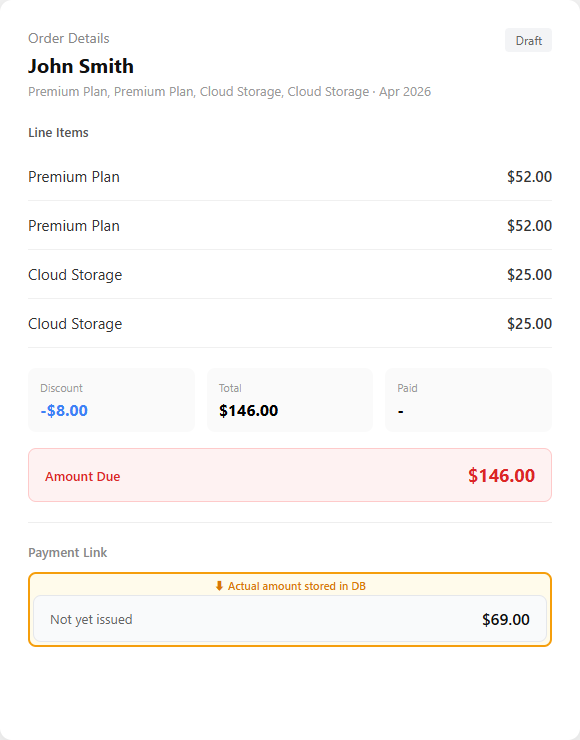
The payment link showed $69.00 — the correct amount. Same screen, $146.00 at the top, $69.00 at the bottom. What on earth happened?
Narrowing Down the Suspect
This system has three layers:
[Database] → [Server (Java)] → [UI (React)]
  Storage      Processing        Display
Database is where the actual data lives. Think of it as spreadsheets. Server reads the data and processes it. The person reading the spreadsheets. UI displays the processed data. The printer.
I checked each layer in order.
Step 1: Check the spreadsheet (Database)
Opened the database directly.
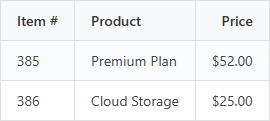
Only 2 rows. No duplicates in the database. Not the culprit.
Step 2: Check the printer (UI)
Looked at the code. It simply says “print each item in the list.” It displays whatever data it receives. The printer is innocent too.
Step 3: The server did it
If the database has 2 items but the screen shows 4, something went wrong when the server fetched the data.
The Culprit: Merging Two Spreadsheets at Once
Here’s where it gets a bit technical, but I’ll keep it simple.
A database is multiple spreadsheets
A database isn’t one giant table — it’s multiple spreadsheets linked together.
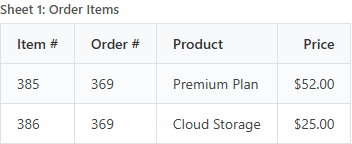
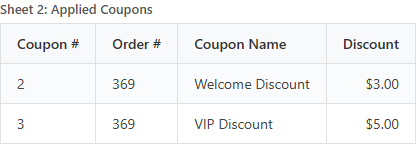
This order system has sheets like these:
“Give me everything at once” was the problem
The server asked the database:
“Give me order #369’s items and coupons all at once.”
The database needs to merge two sheets into one. And here’s where things go wrong.
Sheet 1 has 2 rows, Sheet 2 has 2 rows. When the database merges them, it creates every possible combination:
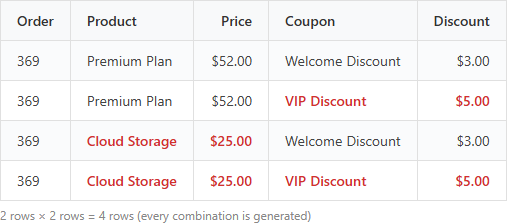
2 rows × 2 rows = 4 rows!
In mathematics, this is called a Cartesian Product (named after René Descartes). It generates every combination of two sets.
A simple analogy:
If you have 2 tops (white, black) and 2 bottoms (jeans, slacks), the possible outfit combinations are 2 × 2 = 4.
(white+jeans), (white+slacks), (black+jeans), (black+slacks)
Databases work exactly the same way. Merge two sheets and you get every combination.
Why coupons were fine but items were duplicated
The server receives 4 rows and needs to split them back:
Coupon list: Welcome Discount, VIP Discount, Welcome Discount, VIP Discount
Coupons go into a deduplicating container (Set). Duplicates are automatically removed.
→ Result: Welcome Discount, VIP Discount ✅ Correct!
Item list: Premium Plan, Premium Plan, Cloud Storage, Cloud Storage
Items go into an ordered list (List). It just stacks everything in order. No dedup.
→ Result: Premium Plan, Premium Plan, Cloud Storage, Cloud Storage ❌ Duplicated!
Why was the payment link correct?
The $69.00 in the payment link was calculated and saved when the order was first created. At that time, the database correctly returned only 2 items.
The $146.00 shown on screen is recalculated from the database every time the page loads. And every time, the multiplication bug kicks in.
The Fix: “Don’t fetch everything at once”
Once the cause was clear, the fix was simple.
Before (fetch together):
“Give me items and coupons at the same time” → 2 × 2 = 4 rows (multiplication)
After (fetch separately):
Request 1: “Give me items” → 2 rows Request 2: “Give me coupons” → 2 rows → 4 rows total, but each is accurate
The code change was just two lines:
// Don't fetch coupons together — load them separately later
@BatchSize(size = 50)  // "Fetch in batches of 50 via separate query"
private Set<OrderAppliedDiscount> appliedDiscounts;
And the “give me everything” request was modified to exclude the coupons part.
We now send 2 requests to the database instead of 1, but getting accurate data is far more important.
Lessons Learned
- When the screen looks wrong, don’t just look at the screen. Trace where the data gets corrupted.
- “Fetching everything at once is faster” is a trap. Merging unrelated data simultaneously causes multiplication.
- “Payment amount is correct but display amount is wrong” was the decisive clue. Understanding “stored value vs. recalculated value” helps pinpoint the bug’s location quickly.
This bug could have caused customers to be charged double. Glad we caught it before the orders were sent out.
Comments