The Problem: Nobody Knows You Deployed
After hitting the deploy button, anxiety kicks in.
Did it succeed? Is the server actually up? There’s no way to know when the new version went live. I open a terminal, check the GitHub Actions tab, SSH into the server to run docker logs, and only then can I relax with “Oh, it’s up.” As a solo developer, there’s nobody else to check for me.
The bigger problem is on the user side. The teachers using CheckUS at their hagwon (Korean private academy/tutoring center) are not developers. When the system gets updated, they ask “What changed?” Every time, I have to manually message them on KakaoTalk (Korea’s dominant messaging app): “A new feature was added to the attendance screen.” If I don’t tell them, they keep using the old workflow without knowing new features exist. Once, someone even asked “Is this bug still not fixed?” when I had already fixed and deployed it — I just hadn’t sent the announcement.
GitHub Marketplace has off-the-shelf Actions like slackapi/slack-github-action and rtCamp/action-slack-notify. Configure them and you get deploy notifications. But if you want fine-grained control over the message content — especially extracting release notes from commits and formatting them in Korean — you’re better off calling the webhook directly with curl.
So I decided to wire Slack notifications directly into the deploy pipeline. Three goals:
- Know about deploy start/completion/failure in real time
- Automatically extract and display what changed
- Messages in Korean that non-developers can understand
Architecture: 3-Stage Notifications
I added Slack webhook calls at three points in the GitHub Actions workflow. Server (Spring Boot), teacher web (React), student app (React) — each submodule has its own deploy workflow, but the structure is identical.
main에 push
  -> 빌드 & 배포 시작
  -> [Slack] "서버 업데이트를 시작합니다"
  -> 실제 배포 (Docker pull, 컨테이너 재시작)
  -> Health check (최대 5분)
  -> [Slack] "업데이트가 완료되었습니다" + 변경사항
  -> (실패 시) [Slack] "배포에 실패했습니다"
The start notification matters for a specific reason. Server deployments involve taking down the Docker container and bringing it back up. During that window — roughly 10 to 20 seconds — connectivity can be unstable. If a teacher is in the middle of taking attendance and suddenly gets an error, they’ll panic. So we send a heads-up: “Connectivity may be briefly unstable.”
Frontend (Cloudflare Pages) uses zero-downtime deployment, so it only sends completion/failure notifications — no start alert needed.
Health Check: What “Deploy Complete” Actually Means
Spring Boot takes a while to start up. Just because the Docker container started doesn’t mean it’s ready to handle traffic. On a t3.small (2GB RAM) instance, Spring Boot typically needs 30 seconds to a minute for a full boot. On heavy swap days, it can take up to 2 minutes.
That’s why I run a health check loop before declaring the deploy complete.
# Spring Boot 부팅 완료 대기 (최대 60회 x 5초 = 5분)
echo "Waiting for server to be ready..."
for i in $(seq 1 60); do
  if curl -sf http://localhost:8080/public/health > /dev/null 2>&1; then
    echo "Server is ready! (attempt $i)"
    break
  fi
  if [ $i -eq 60 ]; then
    echo "Server did not become ready within 60 attempts"
    exit 1
  fi
  sleep 5
done
/public/health is an unauthenticated endpoint. curl -sf checks for HTTP 200 — success means the server is up; otherwise, wait 5 seconds and retry. If there’s no response within 60 attempts (5 minutes), exit 1 fails the workflow, which automatically triggers the failure notification on Slack.
Before this loop existed, I would manually open a browser after each deploy to check if the site was actually loading. Now, when the completion message shows up in Slack, that is the confirmation that everything’s working.
Automatic Release Note Extraction
This is the most important part of the deploy notification. “Update complete” alone isn’t enough. You need to tell people what changed.
Lines tagged with [release-note] are automatically extracted from commit messages.
# 1차: [release-note] 태그 추출
RELEASE_NOTES=""

if [ "$BEFORE_SHA" != "0000000000000000000000000000000000000000" ]; then
  NOTES_FROM_COMMITS=$(git log "${BEFORE_SHA}..${AFTER_SHA}" \
    --format="%B" \
    | grep '^\[release-note\]' \
    | sed 's/^\[release-note\] /• /' || true)
  if [ -n "$NOTES_FROM_COMMITS" ]; then
    RELEASE_NOTES="$NOTES_FROM_COMMITS"
  fi
fi

# 2차: [release-note]가 없으면 커밋 subject로 fallback
if [ -z "$RELEASE_NOTES" ]; then
  NOTES_FALLBACK=$(git log "${BEFORE_SHA}..${AFTER_SHA}" \
    --format="• %s" --no-merges \
    | grep -v "^• chore:" || true)
  if [ -n "$NOTES_FALLBACK" ]; then
    RELEASE_NOTES="$NOTES_FALLBACK"
  fi
fi
$BEFORE_SHA and $AFTER_SHA come from GitHub Actions’ github.event.before and github.event.after. The script pulls lines starting with [release-note] from commit bodies in that range and converts them to bullet points.
What if a push has zero [release-note] lines? Then it falls back to commit subjects (%s). Commits prefixed with chore: are excluded since they’re meaningless to end users. Merge commits are also filtered out with --no-merges.
The || true scattered throughout prevents the entire script from failing when grep returns zero matches (exit code 1). When set -e is active in a shell script, a grep with zero matches kills the entire pipeline.
JSON Escaping: The Slack Webhook Pitfall
Once the release notes are extracted, they need to go to Slack. This is where I hit a snag. If commit messages contain double quotes (") or newlines, the JSON breaks.
# 슬랙 메시지 구성
if [ -n "$RELEASE_NOTES" ]; then
  MESSAGE="✅ CheckUS 서버 업데이트가 완료되었습니다.\n\n📋 변경사항:\n${RELEASE_NOTES}"
else
  MESSAGE="✅ CheckUS 서버 업데이트가 완료되었습니다."
fi

# Python으로 JSON-safe 이스케이프
ESCAPED_MESSAGE=$(echo -e "$MESSAGE" \
  | python3 -c 'import json,sys; print(json.dumps(sys.stdin.read().strip()))')

curl -s -X POST "$SLACK_WEBHOOK_URL" \
  -H 'Content-Type: application/json; charset=utf-8' \
  -d "{\"text\":${ESCAPED_MESSAGE}}"
You could use jq, but GitHub Actions’ Ubuntu runner comes with Python3 preinstalled, so I went with json.dumps. It correctly escapes double quotes, backslashes, newlines, and everything else. Since the output is already wrapped in quotes, you can drop ${ESCAPED_MESSAGE} directly into the curl call.
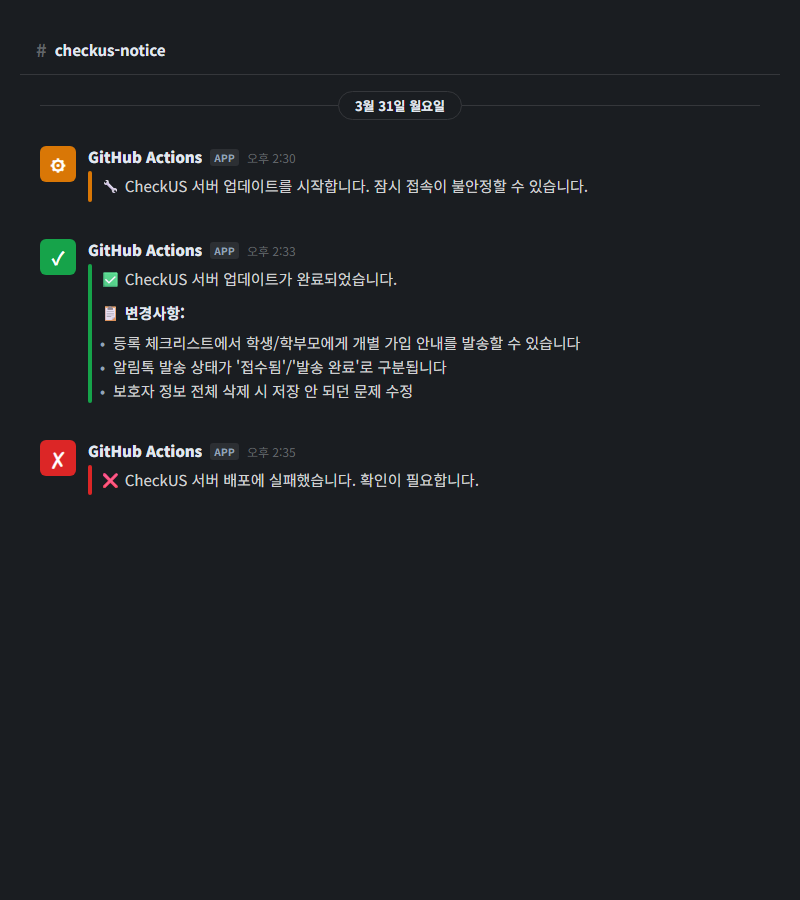
The final message in Slack looks like this:
✅ CheckUS 서버 업데이트가 완료되었습니다.

📋 변경사항:
• 등록 체크리스트에서 학생/학부모에게 개별 가입 안내를 발송할 수 있습니다
• 알림톡 발송 상태가 '접수됨'/'발송 완료'로 구분됩니다
• 보호자 정보 전체 삭제 시 저장 안 되던 문제 수정
How the Convention Evolved: Why V1 Failed
Initially, I set a simple rule: add [release-note] to every fix: / feat: commit.
feat: add bulk invite feature for registration checklist

[release-note] 등록 체크리스트에서 학생/학부모에게 개별 가입 안내를 발송할 수 있습니다
Logically, it makes sense. Record the change at every commit, so nothing gets missed. But in practice, problems emerged.
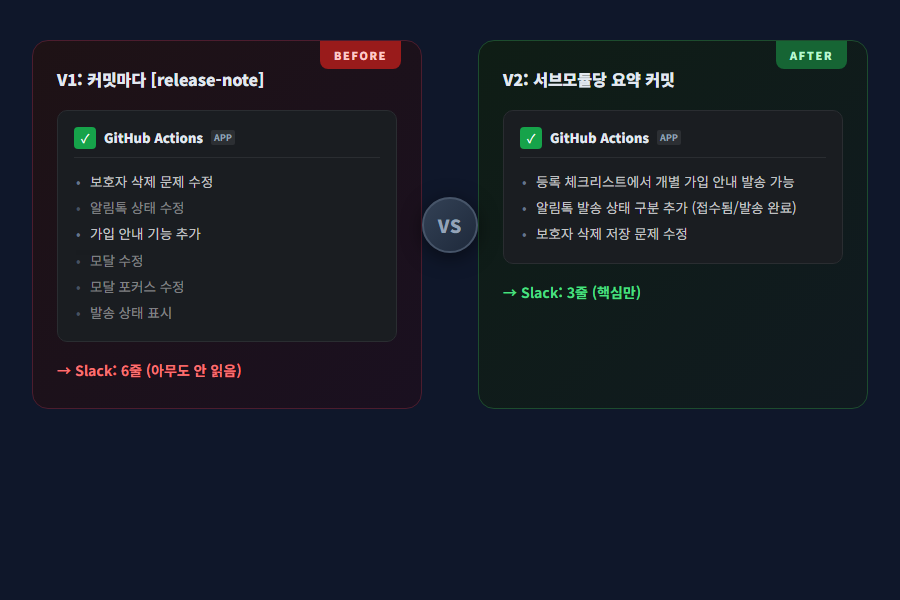
A single feature generates 10 to 15 commits. Add server, frontend, and docs together, and it’s even more. If every commit gets a [release-note], the deploy notification becomes a 20-to-30-line wall of text. People don’t read long Slack messages. Non-developers especially just glance at the first two lines and move on.
So I switched from per-commit recording to per-deploy summaries.
V2: One Release Summary Per Submodule
Individual commits don’t use [release-note]. Instead, right before pushing to main, I add a single summary commit per submodule.
chore: release notes for F279 signup, F275 design

[release-note] 등록 체크리스트에서 학생/학부모에게 개별 가입 안내를 발송할 수 있습니다
[release-note] 알림톡 발송 상태가 '접수됨'/'발송 완료'로 구분됩니다
[release-note] 보호자 정보 전체 삭제 시 저장 안 되던 문제 수정
The rules are simple:
- User-friendly descriptions in Korean
- 5 lines or fewer per submodule
- Group related commits into one line (e.g., 4 modal fixes become “Modal UI improvements”)
- It’s a
chore:commit, so it won’t get caught by the fallback either — only the[release-note]lines are extracted
No CI code changed at all. The existing grep '^\[release-note\]' extraction logic works exactly the same. Whether the notes are scattered across commits or consolidated in a single summary commit, grep doesn’t care.
This wasn’t a tooling problem — it was a communication design problem. Technically, V1 and V2 work identically. The difference is whether the recipient actually reads it. Deploy notifications aren’t developer logs; they’re user-facing announcements. And announcements need to be short.
Failure Notifications: Simple but Critical
- name: Notify Slack - Deploy Failed
  if: failure()
  run: |
    curl -s -X POST "$SLACK_WEBHOOK_URL" \
      -H 'Content-Type: application/json; charset=utf-8' \
      -d '{"text":"❌ CheckUS 서버 배포에 실패했습니다. 확인이 필요합니다."}'
GitHub Actions’ if: failure() triggers whenever any previous step fails. Build failure, deploy failure, health check timeout — whatever the cause, this notification fires.
For a solo developer, failure notifications are invaluable. If you deploy on Friday evening and go home without knowing it failed, the service could be down all weekend. One Slack notification and you can check immediately.
Results
I’ve been running this system for about two months now. Three noticeable changes:
Teachers started reading deploy notifications. When I was sending 20-line messages in V1, there was zero reaction. After switching to V2 with 3-to-4-line summaries, teachers started responding with “Oh, this feature was added” and actually trying it out. Questions like “When will this be fixed?” also decreased — the deploy notification had already answered that.
Deploy failures are caught immediately. Before, I would only find out when a user contacted me saying “I can’t access the site.” Now, when a failure notification comes in, I check on my phone and take action right away. Once, a Docker image pull failed because the EC2 instance ran out of disk space. Thanks to the failure alert, I responded within 5 minutes.
Change history accumulates automatically. Deploy messages pile up chronologically in the Slack channel. If I wonder “When was this feature deployed?”, I just search Slack. No need to maintain a separate changelog file.
Wrap-Up
Here’s the full architecture at a glance:
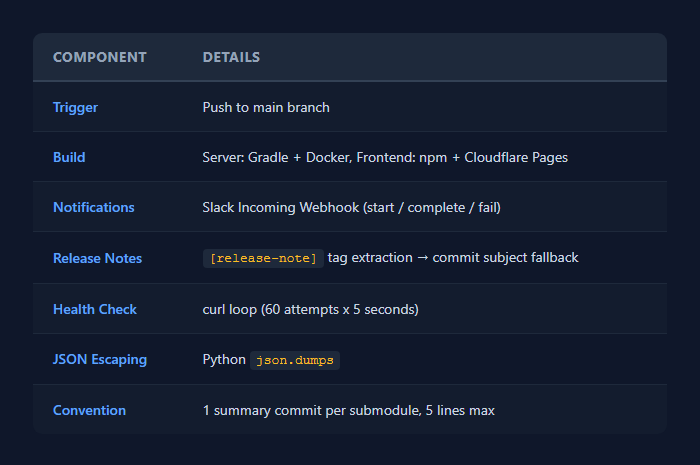
Nothing technically complex here. Bash scripts, curl, grep, one line of Python. If you’re already using GitHub Actions, you can set this up in 30 minutes.
What matters more than the tools is the design. Who are you notifying, what information are they getting, and how short can you keep it? Developers will read an entire commit log. But if the audience for your deploy notification is non-developers, it’s an announcement, not a log. The biggest lesson from this project was that switching from V1 to V2 wasn’t a one-line code change — it was a shift in communication approach.
Comments