TL;DR
- Notion API rate limits made it impossible to analyze thousands of pages
- Discovered Notion desktop app stores a local SQLite cache
- Read 20K pages in 3 seconds without any API calls
- Added Windows support to a macOS-only tool and submitted my first PR
The Problem: Too Much Notion Data
I run a tutoring academy and have been logging consultation records in Notion for years. Thousands of pages worth. I wanted to analyze this data with Claude.
Attempt 1: Official Notion API
429 Too Many Requests
Hit the rate limit almost immediately with this much data.
Attempt 2: Notion Export
Settings → Export → Markdown & CSV. Failed completely—too much data.
Attempt 3: Official Notion MCP Server
Tried the OAuth integration, but it uses the API internally. Same problem.
The Discovery: Local SQLite Cache
Found the solution in this GPTers post (Korean).
The key insight:
Notion desktop app stores data locally as a SQLite database. You can read it directly without any API calls.
Notion mirrors server data to local SQLite for offline sync, and the cache is surprisingly well-structured.
Cache locations:
- macOS:
~/Library/Application Support/Notion/notion.db - Windows:
%APPDATA%/Notion/notion.db
Checked my machine—found a 628MB SQLite file sitting there.
But It Was macOS Only
Tried using notion-mcp-fast from the article.
claude mcp add notion-local -- uvx \
    --from "git+https://github.com/chat-prompt/notion-mcp-fast" \
    notion-mcp-fast
Result:
FileNotFoundError: Notion database not found at
~/Library/Application Support/Notion/notion.db
The macOS path was hardcoded. I’m on Windows.
Fixed It Myself
Opened the code—turned out to be pretty simple. The path setting in reader.py:
# Original (macOS only)
NOTION_DB_PATH = os.path.expanduser(
    "~/Library/Application Support/Notion/notion.db"
)
Changed it to detect OS automatically:
import platform

def _get_default_notion_db_path() -> str:
    # Allow env variable override
    if env_path := os.environ.get("NOTION_DB_PATH"):
        return env_path

    system = platform.system()
    if system == "Darwin":  # macOS
        return os.path.expanduser(
            "~/Library/Application Support/Notion/notion.db"
        )
    elif system == "Windows":
        return os.path.join(
            os.environ.get("APPDATA", ""),
            "Notion",
            "notion.db"
        )
    else:  # Linux
        return os.path.expanduser("~/.config/Notion/notion.db")

NOTION_DB_PATH = _get_default_notion_db_path()
What I added:
- OS detection via
platform.system() - Windows:
%APPDATA%/Notion/notion.db - Linux:
~/.config/Notion/notion.db NOTION_DB_PATHenv variable for custom paths
The Linux path follows Arch Wiki’s XDG Base Directory standard, but I couldn’t verify if Notion actually uses this path. The Linux path is an educated guess—actual Notion AppImage/Snap environments may differ. Asked for feedback in the PR.
Submitting the PR
Decided to submit a PR while I was at it. First time contributing to open source—a bit nervous.
Fork → Branch → Commit → Push → PR
# 1. Fork (on GitHub web)

# 2. Clone and modify
git clone https://github.com/chat-prompt/notion-mcp-fast
cd notion-mcp-fast
# ... make changes ...

# 3. Add fork as remote
git remote add fork https://github.com/yunjeongiya/notion-mcp-fast.git

# 4. Create branch and commit
git checkout -b feat/cross-platform-support
git add src/notion_mcp_fast/reader.py
git commit -m "feat: add cross-platform support (Windows, Linux)"

# 5. Push and create PR
git push -u fork feat/cross-platform-support
# Create PR on GitHub
PR link: https://github.com/chat-prompt/notion-mcp-fast/pull/1
It was the first PR to this repo. Wasn’t sure if it would get merged…
Result
Works on Windows.
claude mcp add notion-local -- uvx \
    --from "C:/Users/YJL/Desktop/notion-mcp-fast" \
    notion-mcp-fast
After restarting Claude Code, these tools became available:
notion_list_pages- List pagesnotion_search_pages- Search by titlenotion_full_text_search- Full text searchnotion_list_databases- List databasesnotion_get_database_records- Query database records
628MB database, thousands of pages loaded in seconds. No rate limit worries.
Test coverage:
- ✅ Windows 11 - Confirmed working
- ⬜ Linux - Untested (no environment, requested feedback in PR)
Takeaways
1. Easier Than Expected
- 3 lines
+ 18 lines
21 lines total. “I want to use this but it doesn’t work → fix it → PR.” That’s it.
2. Reach Out to the Author
Left a comment on the original author’s Threads. Got merged immediately.
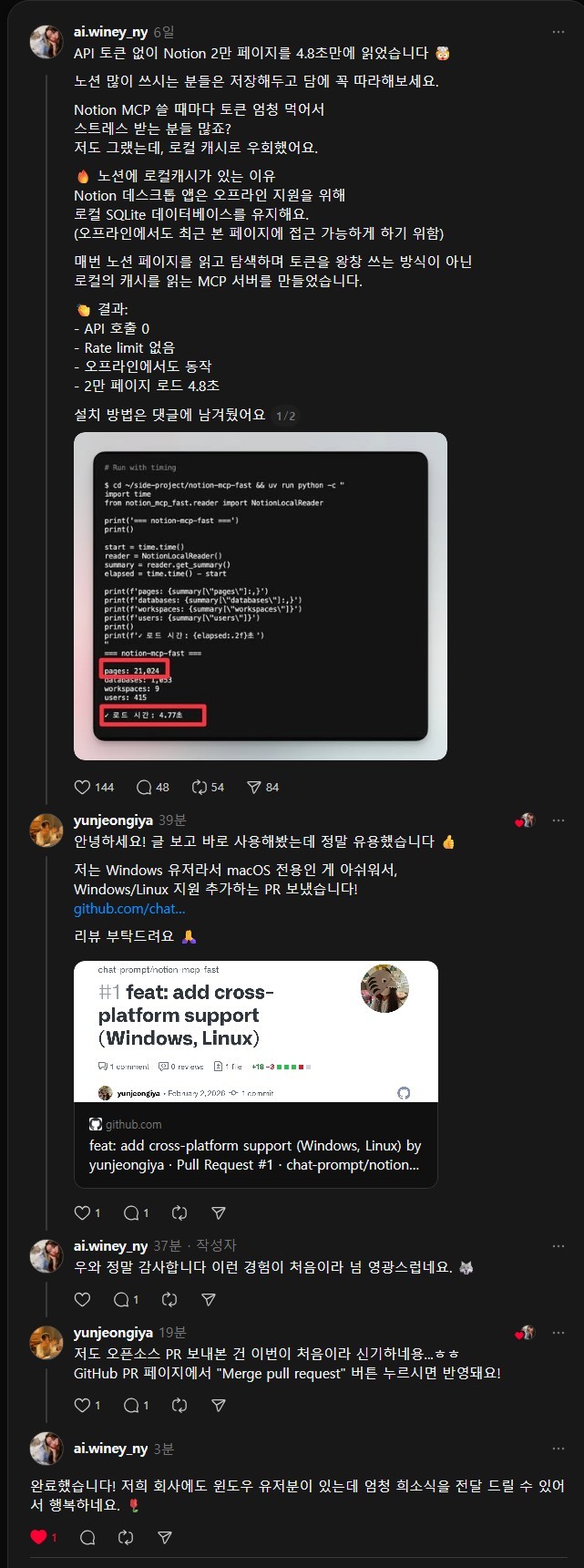
Gets your PR reviewed faster and builds community connections.
3. MIT License
Modify, distribute, sell—all allowed. Just keep the copyright notice.
References
The PR has been merged—the original repo now supports Windows and Linux out of the box.
Comments