Series Navigation
- Part 1: One Account, Multiple Schools, Multiple Roles
- Part 2: 4-Tier Security to Prevent Data Leaks in Multi-Tenancy ← Current
- Part 3: Multi-Campus, Multi-Role JWT Design and ThreadLocal Safety
- Part 4: Comparing 5 Row-Level Security Implementations and Selection Guide
- Part 5: Legacy System Multi-Tenancy Migration (Coming Soon)
Previously
Part 1 explored three multi-tenancy patterns (Database-per-Tenant, Schema-per-Tenant, Row-Level Security) and why CheckUS chose Row-Level Security for cross-campus support.
However, the biggest challenge with Row-Level Security was: “What if developers accidentally forget to add filters?”
// ❌ Risk: Missing campus_id filter
@GetMapping("/students")
public List<Student> getStudents() {
    return studentRepository.findAll();  // 💥 Exposes all campus data!
}
This article explores CheckUS’s 4-Tier Campus Filtering Architecture designed to solve this problem.
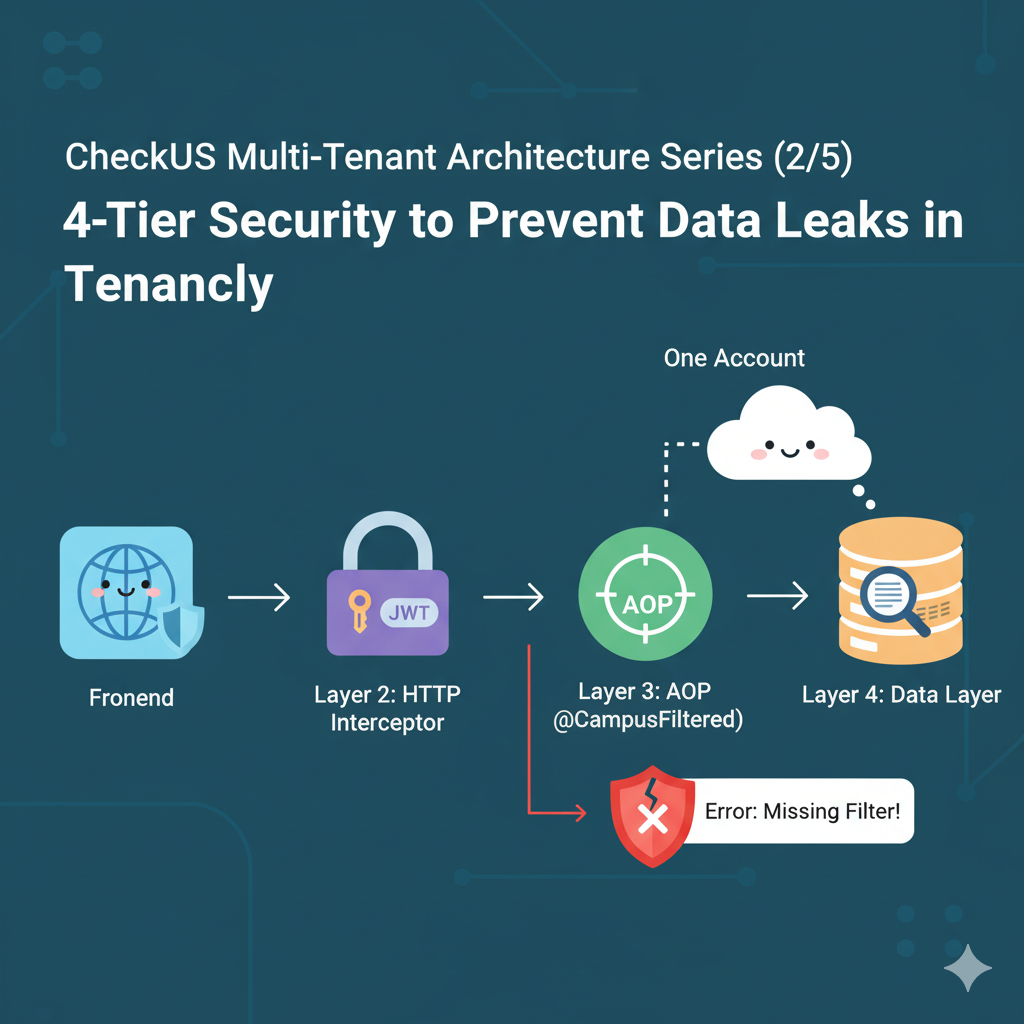
4-Tier Architecture Overview
CheckUS implemented 4 layers of security checks from frontend to database.
🌐 Layer 1: Frontend (Axios Interceptor)
    ↓ Automatically adds X-Campus-Id header

🔒 Layer 2: HTTP Interceptor (Spring)
    ↓ Parses header + validates permissions

🎯 Layer 3: AOP (@CampusFiltered)
    ↓ Verifies ThreadLocal existence

💾 Layer 4: Service Layer
    ↓ Retrieves campusId from ThreadLocal for queries
Each layer operates independently, and data can only be accessed after passing all 4 layers.
Layer 1: Frontend Axios Interceptor — Preventing Human Error
Problem Recognition
If developers manually add X-Campus-Id headers for every API call:
// ❌ Repeated for every API call
const students = await api.get('/students', {
  headers: { 'X-Campus-Id': currentCampusId }
});

const schedules = await api.get('/schedules', {
  headers: { 'X-Campus-Id': currentCampusId }  // Duplication!
});
- ⚠️ Developers might forget to add headers
- ⚠️ Code duplication (boilerplate)
- ⚠️ Campus switching logic scattered
Solution: Axios Request Interceptor
User’s Perspective: Campus Selection

When users select a campus from the top menu, this information is stored globally and automatically included in all API requests.
// Frontend - API Client Setup (src/api/axiosInstance.ts)

import axios from 'axios';
import { getCurrentCampusId } from '@/utils/campusContext';

const apiClient = axios.create({
  baseURL: import.meta.env.VITE_API_BASE_URL,
});

// 🎯 Request Interceptor: Automatically adds X-Campus-Id to all API calls
apiClient.interceptors.request.use(
  (config) => {
    const campusId = getCurrentCampusId();

    if (campusId) {
      config.headers['X-Campus-Id'] = campusId;
    }

    return config;
  },
  (error) => Promise.reject(error)
);

export default apiClient;
Benefits
- ✅ Developers only call
api.get('/students') - ✅
X-Campus-Idheader automatically added to all requests - ✅ Campus switching logic centralized in one place
Campus Context Management
// Frontend - Campus Context Management (src/utils/campusContext.ts)

import { create } from 'zustand';

interface CampusStore {
  currentCampusId: number | null;
  setCurrentCampusId: (campusId: number) => void;
}

export const useCampusStore = create<CampusStore>((set) => ({
  currentCampusId: null,
  setCurrentCampusId: (campusId) => set({ currentCampusId: campusId }),
}));

export const getCurrentCampusId = () => {
  return useCampusStore.getState().currentCampusId;
};
Usage Example
// Switch campus in component
function CampusSwitcher() {
  const { setCurrentCampusId } = useCampusStore();

  const handleCampusChange = (campusId: number) => {
    setCurrentCampusId(campusId);  // Just change state!
  };

  return <Select onChange={handleCampusChange}>...</Select>;
}

// API call (header automatically added)
function StudentList() {
  const { data } = useQuery(['students'], () =>
    api.get('/students')  // X-Campus-Id header automatically included
  );

  return <div>{data.map(s => s.name)}</div>;
}
Layer 2: Backend HTTP Interceptor — Authorization Gate
Role
The HTTP Interceptor:
- Parses and extracts the
X-Campus-Idheader sent from frontend - Validates permissions by comparing with JWT token
- Stores in ThreadLocal
Implementation
// Backend - HTTP Interceptor Implementation

@Component
public class CampusContextInterceptor implements HandlerInterceptor {

    private final JwtTokenProvider jwtTokenProvider;

    @Override
    public boolean preHandle(HttpServletRequest request,
                           HttpServletResponse response,
                           Object handler) throws Exception {

        // 1. Extract X-Campus-Id header
        String campusIdHeader = request.getHeader("X-Campus-Id");

        if (campusIdHeader == null || campusIdHeader.isEmpty()) {
            throw new BusinessException("CAMPUS_ID_REQUIRED",
                "X-Campus-Id header is required.");
        }

        Long requestedCampusId = Long.parseLong(campusIdHeader);

        // 2. Check user's campus permissions from JWT token
        String token = extractToken(request);
        Set<Long> userCampusIds = jwtTokenProvider.getCampusIds(token);

        // 3. Validate permissions: Does user have access to requested campus?
        if (!userCampusIds.contains(requestedCampusId)) {
            throw new BusinessException("CAMPUS_ACCESS_DENIED",
                "Access denied for this campus.");
        }

        // 4. Store in ThreadLocal (used by Layer 4)
        CampusContextHolder.setCampusIds(Set.of(requestedCampusId));

        return true;
    }

    @Override
    public void afterCompletion(HttpServletRequest request,
                               HttpServletResponse response,
                               Object handler,
                               Exception ex) {
        // Clean up ThreadLocal after request (prevents memory leaks)
        CampusContextHolder.clear();
    }

    private String extractToken(HttpServletRequest request) {
        String bearerToken = request.getHeader("Authorization");
        if (bearerToken != null && bearerToken.startsWith("Bearer ")) {
            return bearerToken.substring(7);
        }
        return null;
    }
}
ThreadLocal Storage
// Backend - ThreadLocal Storage

public class CampusContextHolder {

    private static final ThreadLocal<Set<Long>> campusIdsHolder = new ThreadLocal<>();

    public static void setCampusIds(Set<Long> campusIds) {
        campusIdsHolder.set(campusIds);
    }

    public static Set<Long> getCampusIds() {
        return campusIdsHolder.get();
    }

    public static Long getSingleCampusId() {
        Set<Long> campusIds = getCampusIds();
        if (campusIds == null || campusIds.isEmpty()) {
            throw new BusinessException("CAMPUS_CONTEXT_EMPTY",
                "Campus context not set.");
        }
        if (campusIds.size() > 1) {
            throw new BusinessException("MULTIPLE_CAMPUS_NOT_ALLOWED",
                "Only single campus allowed.");
        }
        return campusIds.iterator().next();
    }

    public static void clear() {
        campusIdsHolder.remove();
    }
}
Registration
// Backend Implementation

@Configuration
public class WebMvcConfig implements WebMvcConfigurer {

    private final CampusContextInterceptor campusContextInterceptor;

    @Override
    public void addInterceptors(InterceptorRegistry registry) {
        registry.addInterceptor(campusContextInterceptor)
                .addPathPatterns("/students/**", "/schedules/**", "/tasks/**")
                .excludePathPatterns("/auth/**", "/health/**");
    }
}
Security Enhancements
- ✅ Cross-checks JWT token and header: Blocks forged
X-Campus-Id - ✅ Blocks unauthorized campus access at the request’s early stage
- ✅ Prevents memory leaks with automatic ThreadLocal cleanup
Layer 3: AOP @CampusFiltered — Enforcing Developer Discipline
Problem Recognition
Even though Layer 2 stores campusId in ThreadLocal, if developers:
@GetMapping("/students")
public List<Student> getStudents() {
    // Not using ThreadLocal! 💥
    return studentRepository.findAll();
}
Ignore ThreadLocal and query everything, data leak risk still exists.
Solution: Automatic Validation with AOP
// Backend Implementation

@Aspect
@Component
public class CampusFilterAspect {

    @Before("@annotation(CampusFiltered)")
    public void checkCampusContext(JoinPoint joinPoint) {
        Set<Long> campusIds = CampusContextHolder.getCampusIds();

        // Error if ThreadLocal is empty!
        if (campusIds == null || campusIds.isEmpty()) {
            String methodName = joinPoint.getSignature().toShortString();
            throw new BusinessException("CAMPUS_CONTEXT_EMPTY",
                String.format("Campus context not set. [%s]", methodName));
        }

        // Logging (for debugging in development)
        log.debug("Campus filtering applied: campusIds={}, method={}",
                  campusIds, joinPoint.getSignature().toShortString());
    }
}
@CampusFiltered Annotation
// Backend Implementation

@Target(ElementType.METHOD)
@Retention(RetentionPolicy.RUNTIME)
@Documented
public @interface CampusFiltered {
    /**
     * Allow querying multiple campuses simultaneously
     * - true: Can use Set<Long> campusIds
     * - false: Only single campusId allowed (default)
     */
    boolean allowMultiple() default false;
}
Service Layer Usage Example
// Backend Implementation

@Service
@Transactional(readOnly = true)
public class StudentService {

    private final StudentRepository studentRepository;

    /**
     * ✅ Safe implementation: @CampusFiltered + ThreadLocal usage
     */
    @CampusFiltered
    public List<Student> getStudents() {
        Long campusId = CampusContextHolder.getSingleCampusId();
        return studentRepository.findByCampusId(campusId);
    }

    /**
     * ✅ Query multiple campuses simultaneously
     */
    @CampusFiltered(allowMultiple = true)
    public List<Student> getStudentsAcrossCampuses() {
        Set<Long> campusIds = CampusContextHolder.getCampusIds();
        return studentRepository.findByCampusIdIn(campusIds);
    }

    /**
     * ❌ What if no @CampusFiltered and ThreadLocal not used?
     * → No AOP error occurs (dangerous!)
     */
    // public List<Student> getDangerousMethod() {
    //     return studentRepository.findAll();  // 💥 Exposes all data
    // }
}
AOP’s Role
- ✅ Automatically validates ThreadLocal existence before method execution
- ✅ Immediately detects with runtime error even if developer forgets ThreadLocal usage
- ✅ Explicitly expresses intent with
@CampusFilteredannotation
Layer 4: Repository Layer — Final Query Isolation
JPA Repository Methods
// Backend Implementation

@Repository
public interface StudentRepository extends JpaRepository<Student, Long> {

    // Query single campus
    List<Student> findByCampusId(Long campusId);

    // Query multiple campuses simultaneously
    List<Student> findByCampusIdIn(Set<Long> campusIds);

    // Complex conditions + campus filtering
    @Query("""
        SELECT s FROM Student s
        WHERE s.campusId = :campusId
          AND s.grade = :grade
          AND s.deletedAt IS NULL
    """)
    List<Student> findActiveByCampusIdAndGrade(
        @Param("campusId") Long campusId,
        @Param("grade") Integer grade
    );
}
Safe Native Queries Too
@Repository
public interface StudentRepository extends JpaRepository<Student, Long> {

    @Query(value = """
        SELECT s.*, AVG(st.duration) as avg_study_time
        FROM students s
        LEFT JOIN study_times st ON s.id = st.student_id
        WHERE s.campus_id = :campusId
        GROUP BY s.id
    """, nativeQuery = true)
    List<StudentWithAvgStudyTime> findStudentsWithAvgStudyTime(
        @Param("campusId") Long campusId
    );
}
Core Principles
- ✅ All queries include
WHERE campus_id = :campusId - ✅ campusId is only retrieved from ThreadLocal (not from parameters)
- ✅ Native Queries also apply filtering without exception
Frontend Protection: ESLint Rules
Even with backend isolation, the frontend could still break the architecture by sending campusId in the request body.
To enforce the contract across teams, CheckUS introduced a custom ESLint rule.
Problem Recognition
Backend is protected with 4-Tier, but frontend might accidentally:
// ❌ Mistake: Including campusId in Request Body
export interface StudentCreateRequest {
  campusId: number;  // 💥 Unnecessary! Sent via X-Campus-Id header
  name: string;
  grade: number;
}
This leads to:
- ⚠️ Duplication with backend (header + body both send)
- ⚠️ Confusion when header and body differ
- ⚠️ Violates CheckUS architecture rules
Solution: ESLint Custom Rule
// Frontend Implementation

export default tseslint.config(
  {
    rules: {
      "no-restricted-syntax": [
        "error",
        {
          // Prohibit campusId field in Request types
          selector: "TSInterfaceDeclaration[id.name=/Request$/]:has(TSPropertySignature[key.name='campusId']):not([id.name='WeeklyScheduleRequest']):not([id.name='CreateExceptionRequest']):not([id.name='UpdateExceptionRequest'])",
          message: "❌ [F067] Do not use campusId field in Request types. CheckUS automatically sends it via X-Campus-Id header."
        }
      ]
    }
  }
);
How it Works
// ❌ ESLint error occurs!
export interface StudentCreateRequest {
  campusId: number;
  // ❌ [F067] Do not use campusId field in Request types.
  name: string;
}

// ✅ Correct implementation
export interface StudentCreateRequest {
  name: string;  // campusId automatically sent via X-Campus-Id header
  grade: number;
}
Exception Cases
WeeklyScheduleRequest: EXTERNAL type allows optional campusIdCreateExceptionRequest: campusId = null for all-campus applicationUpdateExceptionRequest: Same
Benefits
- ✅ Detects architecture violations at compile time
- ✅ VSCode shows immediate red underline
- ✅ Automatically verified in CI/CD pipeline
Complete Flow: 4-Tier Working Together
Scenario: Query Student List
1. 🌐 Frontend (Axios Interceptor)
   User: Selects Gangnam Study Center
   Zustand Store: currentCampusId = 1
   Axios: GET /students + header { X-Campus-Id: 1 }

   ↓

2. 🔒 HTTP Interceptor (Spring)
   Parse header: campusId = 1
   JWT validation: User has [1, 2] campus permissions → ✅ Pass
   ThreadLocal: CampusContextHolder.set([1])

   ↓

3. 🎯 AOP (@CampusFiltered)
   @Before: Check ThreadLocal exists → ✅ Exists
   Logging: "Campus filtering: campusIds=[1], method=getStudents()"

   ↓

4. 💾 Service Layer
   StudentService.getStudents():
     - campusId = CampusContextHolder.getSingleCampusId()  // 1
     - studentRepository.findByCampusId(1)
     - SQL: SELECT * FROM students WHERE campus_id = 1

   ↓

5. 📤 Response
   Returns only Gangnam Study Center students ✅
Attack Scenario: Unauthorized Campus Query Attempt
1. 🌐 Frontend (Malicious Request)
   Hacker: X-Campus-Id: 999 (unauthorized campus)

   ↓

2. 🔒 HTTP Interceptor
   JWT validation: User only has [1, 2] permissions
   999 not included → ❌ CAMPUS_ACCESS_DENIED exception

   Request blocked! (Layers 3, 4 not executed)
Developer Mistake Scenario: Missing ThreadLocal Usage
1-2. Frontend → HTTP Interceptor
   Normal processing, stores campusId = 1 in ThreadLocal

   ↓

3. 🎯 AOP
   @Before: Check ThreadLocal exists → ✅ Exists

   ↓

4. 💾 Service Layer (Developer Mistake)
   @CampusFiltered
   public List<Student> getBuggyMethod() {
       // Not using ThreadLocal!
       return studentRepository.findAll();  // 💥
   }

   Result: AOP passed, but queries all data

   ⚠️ This case cannot be completely prevented by 4-Tier
   → Needs code review + integration tests
Limitations and Supplements
- ❌ AOP only checks ThreadLocal existence, not usage
- ✅ Supplement 1: Code reviews must verify
@CampusFilteredmethods use ThreadLocal - ✅ Supplement 2: Integration tests verify no mixing of other campus data
Advantages of 4-Tier Architecture
1. Defense in Depth
Frontend (1st defense) → HTTP (2nd defense) → AOP (3rd defense) → Service (4th defense)
- ✅ If one layer is breached, the next layer blocks it
- ✅ Minimizes security incident possibilities
2. Explicit Intent Expression
@CampusFiltered  // "This method requires campus filtering"
public List<Student> getStudents() {
    ...
}
- ✅ Code clearly shows campus filtering requirement
- ✅ Easy for new developers to understand during onboarding
3. Consistent Pattern
// All Service methods follow the same pattern
@CampusFiltered
public List<X> getX() {
    Long campusId = CampusContextHolder.getSingleCampusId();
    return xRepository.findByCampusId(campusId);
}
- ✅ Low learning curve
- ✅ Easy code reviews
4. Frontend-Backend Integration
- ✅ Axios Interceptor + ESLint protects frontend too
- ✅ Entire team follows the same architecture rules
Summary: Why 4 Layers Instead of Just One?
Each layer provides a specific guarantee:
| Layer | What It Prevents |
|---|---|
| Layer 1: Axios Interceptor | Developers cannot forget to add X-Campus-Id header |
| Layer 2: HTTP Interceptor | Backend cannot accept forged or unauthorized campusId |
| Layer 3: AOP | Developers cannot skip campus filtering logic |
| Layer 4: Repository | Queries cannot accidentally fetch cross-campus data |
The result? Even if a developer makes a mistake in one layer, the others catch it before data leaks.
Next Episode Preview
Part 2 explored how CheckUS’s 4-Tier architecture is implemented, examining each layer’s role and code in detail.
Part 3: Multi-Campus, Multi-Role JWT Design and ThreadLocal Safety will cover:
- 🔐 JWT Token Design: How to store multiple campus roles?
- ⚡ ThreadLocal Performance Issues and Solutions
- 🧪 Integration Testing: How to verify campus isolation?
- 📊 Monitoring: Real-time detection of missing campus filters
- 🐛 Real edge cases discovered in production
We’ll reveal problems encountered in practice and their solutions.
👉 Continue to Part 3: Multi-Campus, Multi-Role JWT Design and ThreadLocal Safety
CheckUS Architecture Series
- Part 1: One Account, Multiple Schools, Multiple Roles
- Part 2: 4-Tier Security to Prevent Data Leaks in Multi-Tenancy ← Current
- Part 3: Multi-Campus, Multi-Role JWT Design and ThreadLocal Safety
- Part 4: Comparing 5 Row-Level Security Implementations and Selection Guide
- Part 5: Legacy System Multi-Tenancy Migration
Comments